





In the second article of our Progress Update series, where we share Quadro’s development process step by step, we are very excited to share important new developments with you.
In our previous update, we announced that the molds for the aluminum extrusion parts to be used in Quadro had been completed. We also shared detailed information about QuadrOS, the operating system that powers Quadro. Together, we took a closer look at QuadrOS’s interface structure, filament management system, automatic calibration steps, and the core logic designed to manage four toolheads in sync.
In this update, we would like to share that the Quadro development project is moving forward at a strong pace and is getting closer to the final stages before production.
In this article, you will see Quadro’s first working prototype and witness its first four-color print test process up close. We will also be sharing important details such as print speed, color transitions, cleaning efficiency, system stability, and the initial performance data we have gathered during the development process.
In our previous Progress Update, we stated that we wanted to see you not only as users following the process, but also as a community directly contributing to Quadro’s development. Your comments, suggestions, and feedback have been extremely valuable to us throughout this process.
We reviewed many of the suggestions you shared with us and included a significant portion of them in Quadro’s development process. Some features have already been directly added to the printer, while others have been included in our development roadmap and are planned to be integrated into the system in the upcoming stages.
In this article, we will share the new features shaped by user feedback, the improvements made on the prototype, and the latest stage Quadro has reached before production.
Now, let’s take a closer look at one of the most exciting stages in the development journey of Co Print Quadro.
1. Community Feedback Turns into Product Improvements
Some of the features added based on your requests are as follows:
1.1 Skip Object Feature
The Skip Object feature has been added to QuadrOS. With this feature, failed parts in multi-object prints can be individually canceled while the rest of the print continues.
1.2 Advanced Camera System
Taking into account the requests we received regarding the camera system, we selected a high-resolution, wide-angle camera. This allows both the print bed and the cleaning area to be monitored easily.
1.3 Open-Source and Community-Friendly Software
Many users pointed out that excessive customization made by some companies on Klipper and OrcaSlicer can reduce ease of use and disconnect users from community updates. We take this feedback very seriously.
In this direction, we would especially like to state that our software will be open-source.
QuadrOS will directly use the Klipper infrastructure and will continue to receive updates from the Klipper ecosystem. At the same time, custom interface improvements designed to enhance the user experience for Quadro’s unique architecture and additional functions will also be included in the system.
We are following the same approach on the OrcaSlicer side. While preserving the core structure, we will only provide additional features required specifically for Quadro.
1.4 Smart Maintenance Management
We are developing a new system within QuadrOS that centrally manages the printer’s maintenance processes.
Nozzle replacement reminders
Axis lubrication alerts
Periodic maintenance tracking
Instant access to Step-by-step guidance via QR code
With this system, users will be able to perform many maintenance operations directly through the printer screen.
1.5 Build Volume
Based on the feedback we received from you, we designed Quadro with a build volume of 300 x 300 x 300 mm. This allows Quadro to stand one step ahead of similar competitors in terms of print area.
2. Mechanical Structure
For Quadro’s critical components that require high rigidity, precision, and excellent flatness — such as the Z towers, main frame, Y bed assembly, X axis, and the carrier rails for the toolheads — we chose durable aluminum parts produced with aluminum injection molding technology instead of manufacturing methods such as laser cutting and bending, which can introduce higher tolerances and potential inaccuracies.
This approach allows us to achieve an extremely rigid structure that minimizes vibration, while also providing superior precision in areas where flatness is critical, especially the print bed.
3. Qdock Station: Clean Nozzle System
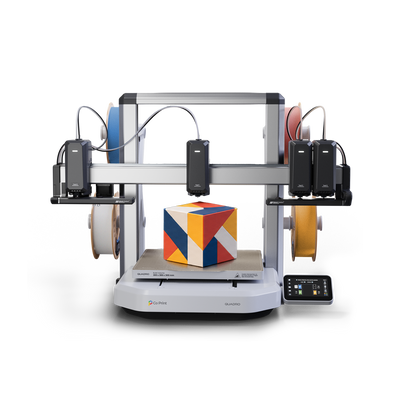
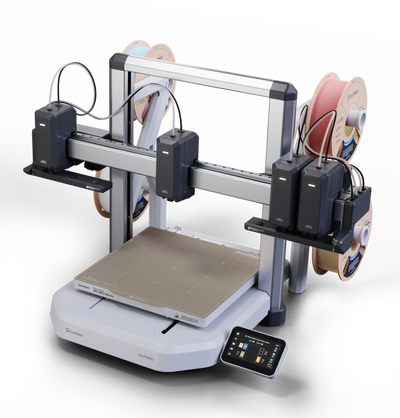
Quadro features specially designed smart parking stations on both the right and left sides of the X axis for its toolheads. These stations clean the nozzles of inactive toolheads, keep their tips sealed, and ensure they remain ready for the next color change.
Once a toolhead completes its print task, it moves to the right or left parking station depending on its position. There, the nozzle is cleaned first. After the cleaning process, the nozzle tip is sealed, and the toolhead is cooled down to approximately 175°C before entering standby mode.
To reduce waiting time during color changes, Quadro prepares the next toolhead before it is needed. The corresponding nozzle is automatically activated approximately 30 seconds before use and heated to printing temperature. This way, the print does not need to pause while the nozzle heats up; when the toolhead becomes active, the system can perform the color change quickly and seamlessly.
This smart parking and preheating system accelerates color transitions in Quadro’s multi-toolhead architecture while also helping reduce filament leakage, nozzle contamination, and unwanted marks on the print surface.
Additionally, a wide-angle camera is positioned in the right-side parking area. With this camera, users can monitor both the print bed and the cleaning area from a wider perspective, allowing for more controlled print supervision.
4. Quadro 360° Calibration System
Quadro’s four independent toolheads must align to the same reference point after each color change and continue printing from the exact point where the print left off. In multi-toolhead printing systems, this alignment is one of the most critical factors directly affecting print quality.
In mechanical systems, micron-level positional differences can occur between each toolhead due to assembly tolerances, manufacturing variations, and part positioning. If these differences are not properly calibrated, alignment issues during color transitions and inconsistencies in print details may occur.
For this reason, we developed a dedicated 360° calibration system for Quadro. This system precisely measures and calculates the positional differences of each toolhead and compensates for them through software. As a result, four independent toolheads can operate in sync as a single unified system throughout the print process.
The calibration process begins with the T0 toolhead and continues sequentially with all toolheads moving to the dedicated calibration area located at the rear-right section of the print bed. Each toolhead touches the calibration rod twice from five contact points: left, right, front, rear, and top, collecting positional data from each direction.
During this process, the measurements taken from the T0 toolhead are accepted as the reference data. Then, the T1, T2, and T3 toolheads repeat the same calibration steps. The values obtained from each toolhead are compared against the T0 reference, and the positional differences between them are calculated with high precision.
These calculated differences are automatically processed by the software, creating separate alignment values for each toolhead. This allows positional deviations caused by mechanical tolerances to be compensated through software, enabling all toolheads to operate in sync based on the same reference point.
5. First 4-Color Print Test
As part of Quadro’s development process, many prototypes have been produced to date. These prototypes are currently being actively used in various test processes, including mechanical performance, software stability, long-term durability, and print quality. Based on the results obtained from these tests, mechanical improvements are being made while software optimization continues in parallel.
In this update, we would like to share one of the multi-color print tests we performed with one of the prototypes currently under active testing. This gives you the opportunity to see Quadro performing a multi-color print up close for the first time.

We would like to highlight an important point: the prototype shown in the images does not represent the final production version. Since testing and revision processes are still ongoing for the aluminum parts, the final surface treatments have not yet been applied to these components. Similarly, the plastic parts are currently being produced using MJF technology for rapid prototyping purposes.
For this reason, any surface differences, gaps, part mismatches, or color variations that may be visible in the video or images will not be present in the final product. The colors, surface textures, and overall finish quality of the plastic and metal parts seen on the printer will be updated and finalized in the mass production version.
The main purpose of this test is to transparently share how Quadro’s multi-toolhead printing system, color change process, and core mechanical-software synchronization perform under real printing conditions.
5.1 Color Printing and Performance Results
Quadro completed the four-color dragon model, measuring 52 x 58 x 60 mm, in a total of 2 hours and 58 minutes, including the print preparation process. This clearly demonstrates Quadro’s speed advantage in multi-color printing.
This model was printed using standard print settings, such as a 0.4 mm nozzle and 0.2 mm layer height. Soon, we will also share detailed comparison tests of the same model printed on different printers under the same conditions.
During the test, the color change time between the two farthest-positioned toolheads was measured at only 3.7 seconds, excluding the prime tower process. When the prime tower process is included, the total color change time is approximately 8 seconds. Quadro successfully completed the dragon model with 541 color changes.
These results show that Quadro’s multi-toolhead architecture provides a significant time advantage during color change processes, positioning the system as a fast, efficient, and high-performance solution for multi-color printing.
6. Quadro StatusLight Feature
To make Quadro’s four independent toolheads easier to manage, we integrated dedicated StatusLight bars onto each toolhead. This interactive lighting system provides real-time visual feedback to the user, especially during filament loading, tool selection, and the printing process, making the overall user experience much more intuitive.
When a tool is selected from the filament selection screen, the lights on all unselected toolheads automatically turn off. Only the StatusLight on the selected toolhead remains active and is highlighted with a spotlight effect. This allows the user to clearly see which toolhead is being operated without any confusion.
This structure provides a major advantage in a system with four different toolheads and multiple filament paths. The user can directly match the tool selected on the screen with the corresponding physical toolhead on the printer. As a result, filament loading, changing, and checking processes can be performed much faster, more intuitively, and with fewer errors.
The StatusLight system does more than simply indicate tool selection. When the filament color selected from the printer screen is successfully loaded into the corresponding toolhead and detected by the filament sensor, the light bar on that toolhead automatically changes to the selected filament color.
This allows the user to track which color is loaded in each toolhead not only through the software interface, but also directly through the printer’s physical light indicators.
7. Development Progress and Kickstarter Timeline
As Quadro approaches the final stages of mechanical design, software development, and overall system validation, it will move toward mass production preparations after prototype testing and interim improvements are completed.
In the upcoming process, the design parameters will be finalized based on the data obtained from testing, mechanical and software optimizations will be completed, and plastic injection molding processes will begin.
Following these stages, Quadro is planned to be launched for pre-order through a Kickstarter campaign in Q4 2026. Our campaign’s upcoming page will also be published on Kickstarter soon and made available for you to follow.
As throughout the development process, we will continue to transparently share all new updates regarding pre-production preparations, the campaign timeline, and Quadro’s journey toward mass production.
8. Beta Program and Quadro Community
As Quadro’s development process continues to move forward, your feedback and suggestions will remain one of the most important guides for us. For this reason, we encourage you to first share your ideas, expectations, and suggestions that you believe could contribute to Quadro’s development in the comments section below this article.
Your comments will play an important role in shaping the next development steps for Quadro. In addition, to follow the process more closely, exchange ideas with our community, and stay up to date with the latest developments, we will soon activate dedicated community channels for Quadro.
In the upcoming stages, we plan to launch a beta testing process with a limited number of users. Users who want to take part in the beta test program, experience Quadro at an early stage, and contribute to the final version of the product with their feedback will be selected from our community members who have been following us and the Quadro development process from the beginning and actively contributing to its progress.
We will announce the details of the beta test program and more through our new Quadro channels on Discord, Reddit, and Facebook.
We continue to develop Co Print Quadro not only as a next-generation multi-color 3D printer, but also as a powerful, reliable, and user-focused production platform shaped together with our community.
Thank you for being a part of this journey.
For more information and further details: info@coprint3d.com


35 yorum
Co Print Quadro Development Update Feedback & Beta Tester Application
Dear Co Print Team,
Thank you very much for sharing such a transparent update on the development process and for giving the community a voice in shaping the project. Feeling like a part of this journey is incredibly valuable to us. I am genuinely excited about the Quadro; as one of the very first participants in the early reservation program, I have already completed my second application as well.
Based on the data you shared, it is highly impressive to see how the 4 independent toolheads (IDEX) significantly minimize time waste compared to alternatives from other brands. Furthermore, having a generous 30×30×30 cm build volume is a massive and crucial game-changer, especially among open-frame combo printers.
To contribute to this development phase, I would like to share a suggestion and expectation: As you know, the biggest common issue with open-frame printers utilizing multi-filament systems (excluding enclosed ones like CFS, AMS, ACE Pro, etc.) is that the filaments remain exposed to the open air and absorb moisture. On various brand platforms, users often design custom enclosed filament boxes, or top-mounted enclosure mods like those made for the Bambu Lab A1 Combo’s AMS Lite. Instead of waiting for the community to come up with third-party models, would it be possible for Co Print to directly design an official enclosed drybox solution? Alternatively, you could even offer a design modification that directly encloses the filaments on the current machine setup. It would be amazing if we could download and print this official model straight from your website, add silica gel inside, and protect our filaments from humidity to achieve higher quality prints. Another highly practical solution for us users would be offering this as an optional, paid add-on accessory (upgrade kit).
Finally, I would love to actively participate in the Beta Testing process for the Quadro. In my current workflow, I actively use the Creality Hi Combo and Bambu Lab A1 Combo printers. This gives me the perfect setup to directly compare the Quadro, subject it to rigorous performance tests, and provide your team with detailed, comprehensive feedback reports. I truly believe I can add significant value to the project regarding production quality and user experience during this testing phase.
I wish you the best of luck with your work and eagerly look forward to the Quadro.
Best regards,
Hocam anakartı, kabloları ısıdan koruduğunuzdan emin olun, BambuLab buradan patladı zamanında. Ayrıyeten, işi sadece tasarım çerçevesinden değil de daha geniş (örn. Kullanım, paketleme, muhafaza etme) bir çerçeveden ele alarak troubleshooting yapmanızı öneririm, mesela makinenin sağında solunda bir şey yokken sorun arz etmeyen bir kablonun makine sağı solu kapalı bi alana alınınca yanlış bir şeye temas edip sorun oluşturması gibi şeyleri ancak böyle saptarsınız. Bence filament tutacağı makinenin üstüne monte olmasın, koyacaksanız onun için de bir aparat koyarsınız ama makinenin stabilizasyonu için filamentlerin yerde durması daha mantıklı. Makinenin 2 sağına 2 soluna takalım, ağırlığı bir avantaja çevirelim desek bu sefer de sağ ve soldaki filament spoolunun, filament gramajının ağırlıkları farklı olunca problem olur. Test aşamasında bence olabildiğince gerçekçi olması için belli başlı insan profilleri seçin hobi amacı güden ticari amaç güden gibi.
Well I hope to get it before 2027 starts. 🥺
I would be interested in beta testing. I own 3 printers and am starting a business selling custom prints. I could provide real world feedback since my printers are running constantly.